Basic visualizations
A chart is not just an image; it is a rhetorical argument. As government statisticians, our job is to reduce the load on policymakers by highlighting key insights clearly.
We will use two main libraries:
Matplotlib: controls axes, titles, file saving
Seaborn: makes statistical plots beautiful by default
Source: Adapted from Seaborn: Visualizing distributions of data
Categorical Data
Census data is often categorical (Regions, Crops).
import seaborn as sns
import matplotlib.pyplot as plt
import pandas as pd

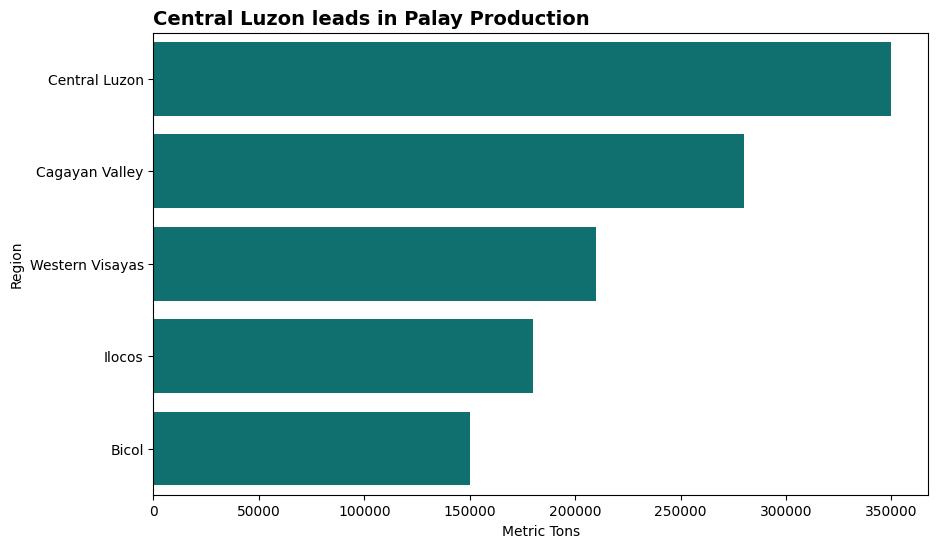
# Sample Data: Palay Production by Region (in Metric Tons)
data = {
    'Region': ['Central Luzon', 'Cagayan Valley', 'Western Visayas', 'Bicol', 'Ilocos'],
    'Production_MT': [350000, 280000, 210000, 150000, 180000]
}
df_crops = pd.DataFrame(data)

# Sort the data
df_sorted = df_crops.sort_values('Production_MT', ascending=False)

# Plot
plt.figure(figsize=(10, 6))
# orient='h' makes it horizontal
sns.barplot(x='Production_MT', y='Region', data=df_sorted, color='teal')

# Polish
plt.title("Central Luzon leads in Palay Production", loc='left', fontsize=14, fontweight='bold')
plt.xlabel("Metric Tons")
plt.show()
Output
Distributions
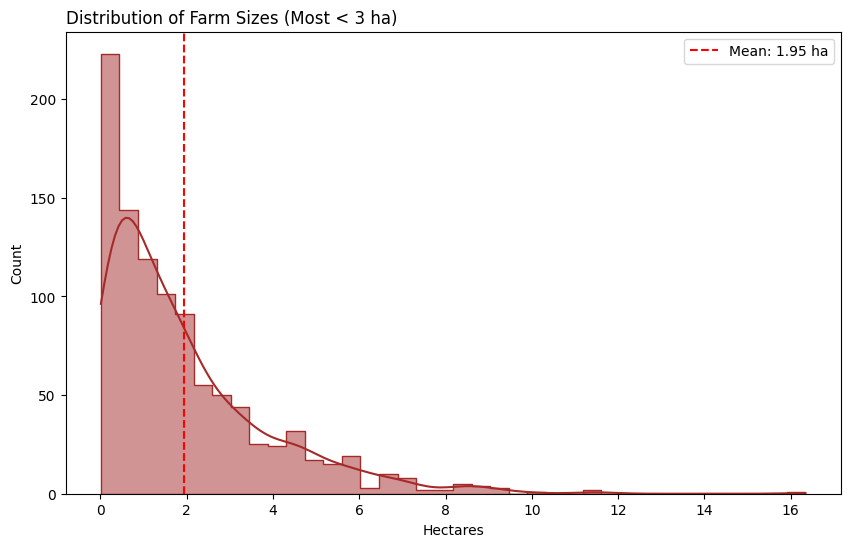
To show the true shape of data, we use histograms with a Kernel Density Estimate (KDE).
Why? It shows if data is “skewed” (e.g., most farmers own < 1 hectare, but a few own 500 hectares).
import numpy as np

# Simulating Farm Size Data (Right-Skewed)
# Most farms are small (1-3 ha), few are large
np.random.seed(42)
farm_sizes = np.random.exponential(scale=2.0, size=1000)

plt.figure(figsize=(10, 6))

# KDE=True draws the smooth curve showing the skew
sns.histplot(farm_sizes, kde=True, color='brown', element="step")

# Add a reference line for the mean
avg_size = np.mean(farm_sizes)
plt.axvline(avg_size, color='red', linestyle='--', label=f'Mean: {avg_size:.2f} ha')

plt.title("Distribution of Farm Sizes (Most < 3 ha)", loc='left')
plt.xlabel("Hectares")
plt.legend()
plt.show()
Output