Demo 1: Decision Trees
Learning Objectives
By the end of this notebook, you will be able to:
Understand Decision Trees: Explain how a single decision tree makes predictions through recursive splitting to partition data into discrete classes, such as water and non-water.
Transform Data for ML: Practice turning raw geospatial data into numbers and table formats so a computer can find patterns using code and math.
Execute a Supervised Workflow: Perform an end-to-end supervised learning project where the algorithm learns classification rules from labeled examples to generate a predictive map
A. Introduction and Setup
Let’s start by importing the necessary libraries and setting up our environment for reproducible results.
# Core scientific computing libraries
import numpy as np
import matplotlib.pyplot as plt

# Geospatial data handling
import rasterio

# Scikit-learn for machine learning
from sklearn.tree import DecisionTreeClassifier
from sklearn.model_selection import train_test_split

# Visualization and layout tools
from matplotlib.colors import ListedColormap

# Suppress warnings for cleaner output
import warnings
warnings.filterwarnings('ignore')

# Set random seeds for reproducibility
RANDOM_STATE = 42
np.random.seed(RANDOM_STATE)

# Configure plotting style
plt.style.use('seaborn-v0_8-darkgrid')
plt.rcParams['figure.figsize'] = (12, 8)

print("✓ Libraries imported successfully!")
print(f"✓ Random state set to: {RANDOM_STATE}")
print(f"✓ NumPy version: {np.__version__}")
print(f"✓ Rasterio version: {rasterio.__version__}")
✓ Libraries imported successfully!
✓ Random state set to: 42
✓ NumPy version: 2.0.2
✓ Rasterio version: 1.4.4
B. Decision Trees Interactive Demo
What is a Decision Tree?
A Decision Tree is a supervised learning algorithm that makes predictions by learning a series of if-then-else decision rules from data. Think of it like a flowchart:
Is NDVI > 0.3?
├─ Yes: Is NIR > 0.5?
│  ├─ Yes: Forest
│  └─ No: Grassland
└─ No: Is SWIR < 0.2?
   ├─ Yes: Water
   └─ No: Urban
Key Concepts:
Root Node: The first decision point (top of the tree)
Internal Nodes: Intermediate decision points
Leaf Nodes: Final predictions (bottom of the tree)
Splitting: How the algorithm decides which feature and threshold to use
Depth: Number of levels in the tree (deeper = more complex)
Let’s Build a Simple Example:
1. Data Loading and Feature Engineering
In this section, we load the multispectral satellite data and create proxy labels for water detection using spectral indices (NDVI and NDWI).
NDVI (Normalized Difference Vegetation Index):
Used to quantify vegetation greenness and is useful in understanding vegetation density.
Formula: NDVI = (NIR + Red) / (NIR − Red)
NDWI (Normalized Difference Water Index):
Used for delineating and monitoring content changes in surface water
Formula: NDWI = (Green + NIR) / (Green − NIR)
# Load Data
file_path = "test_image.tif"

with rasterio.open(file_path) as src:
    # Read and flatten bands
    green = src.read(2).flatten()
    red   = src.read(3).flatten()
    nir   = src.read(4).flatten()

    # Store metadata for reconstruction
    height, width = src.height, src.width
    rgb_raw = src.read([4, 3, 2])

# Generate Proxy Labels (Ground Truth)
ndwi_label = (green - nir) / (green + nir + 1e-6)
ndvi_label = (nir - red) / (nir + red + 1e-6)

# Create binary water mask: High NDWI AND Low NDVI
y_water_proxy = np.zeros_like(ndwi_label)
y_water_proxy[(ndwi_label > 0.0) & (ndvi_label < 0.2)] = 1

print(f"✓ Image Dimensions: {height}x{width}")
print(f"✓ Total Pixels: {len(ndwi_label)}")
print(f"✓ Proxy Water Pixels: {int(np.sum(y_water_proxy))}")
✓ Image Dimensions: 74x76
✓ Total Pixels: 5624
✓ Proxy Water Pixels: 3229
2. Model Training and Prediction
We will now train a Decision Tree classifier to recognize “water” based on the spectral signatures of the Green, Red, and NIR bands.
# Prepare Training Data

# Filter out invalid (zero) pixels to improve training quality
valid_mask = (red > 0) & (nir > 0) & (green > 0)
X = np.stack([green[valid_mask], red[valid_mask], nir[valid_mask]], axis=1)
y = y_water_proxy[valid_mask]

# Data Inspection
print("📊 Dataset Statistics:")
print("━" * 30)
print(f"Dataset shape:      {X.shape} (Pixels, Bands)")
print(f"Number of samples:  {X.shape[0]}")
print(f"Number of features: {X.shape[1]} (Green, Red, NIR)")
print(f"Classes:            {np.unique(y)} (0: Non-water, 1: Water)")

# Calculate distribution
counts = np.bincount(y.astype(int))
print(f"Class distribution: Non-Water: {counts[0]}, Water: {counts[1]}")
print("━" * 30)

# Split data
X_train, X_test, y_train, y_test = train_test_split(
    X, y, random_state=RANDOM_STATE
)
📊 Dataset Statistics:
━━━━━━━━━━━━━━━━━━━━━━━━━━━━━━
Dataset shape: (5624, 3) (Pixels, Bands)
Number of samples: 5624
Number of features: 3 (Green, Red, NIR)
Classes: [0. 1.] (0: Non-water, 1: Water)
Class distribution: Non-Water: 2395, Water: 3229
━━━━━━━━━━━━━━━━━━━━━━━━━━━━━━
# Train Model
water_model = DecisionTreeClassifier(max_depth=3, random_state=RANDOM_STATE)
water_model.fit(X_train, y_train)

# Evaluation Metrics
train_accuracy = water_model.score(X_train, y_train)
test_accuracy = water_model.score(X_test, y_test) # Checking against unseen data

print(f"📊 Model Performance:")
print(f"✓ Training Accuracy: {train_accuracy:.3f}")
print(f"✓ Tree Depth:       {water_model.get_depth()}")
print(f"✓ Number of Leaves: {water_model.get_n_leaves()}")

# Generate Map for the entire image
X_full = np.stack([green, red, nir], axis=1)
predictions = water_model.predict(np.nan_to_num(X_full))
water_map = predictions.reshape(height, width)

print(f"✓ Full image prediction complete.")
📊 Model Performance:
✓ Training Accuracy: 0.984
✓ Tree Depth: 3
✓ Number of Leaves: 7
✓ Full image prediction complete.
3. Visualization and Results
Finally, we compare our predicted water map against the True Color (RGB) reference image to evaluate the model’s performance.
# Visualization
fig, (ax1, ax2) = plt.subplots(1, 2, figsize=(20, 10), sharex=True, sharey=True)

# Plot 1: RGB Reference
# Perform a 2% linear stretch for better visualization
rgb = rgb_raw.transpose(1, 2, 0).astype(float)
p2, p98 = np.percentile(rgb, (2, 98))
rgb_stretched = np.clip((rgb - p2) / (p98 - p2), 0, 1)

ax1.imshow(rgb_stretched)
ax1.set_title("True Color (RGB) Reference", fontsize=15, fontweight='bold')
ax1.axis('off')

# Plot 2: Water Map
water_cmap = ListedColormap(['#f0f0f0', '#00008b']) # Light grey and Deep Blue
im = ax2.imshow(water_map, cmap=water_cmap)
ax2.set_title("Water Detection Map (Decision Tree)", fontsize=15, fontweight='bold')
ax2.axis('off')

# Add Legend
cbar = plt.colorbar(im, ax=ax2, ticks=[0.25, 0.75], fraction=0.046, pad=0.04)
cbar.ax.set_yticklabels(['Non-Water', 'Water'])

plt.tight_layout()
plt.show()

print("\n💡 TIP: Decision Trees are great for EO because they create clear 'if-then' rules")
print("based on spectral thresholds, making the classification process easy to interpret.")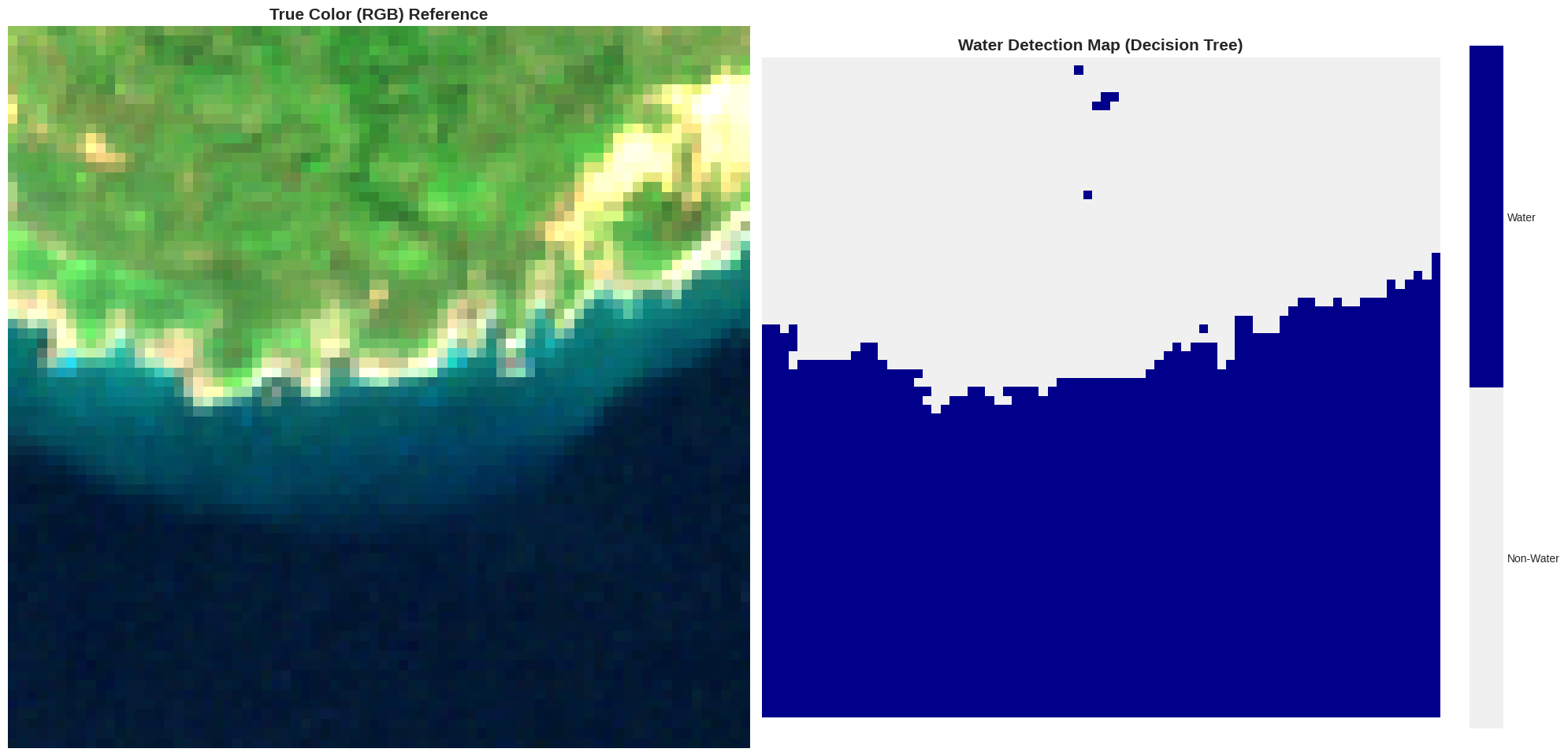
💡 TIP: Decision Trees are great for EO because they create clear 'if-then' rules
based on spectral thresholds, making the classification process easy to interpret.
Visualize the Tree Structure
Let’s look inside the tree to see the actual decision rules it learned.
from sklearn.tree import plot_tree

# Configure the visual parameters
plt.figure(figsize=(25, 12)) # Wider figure for better readability

# Plot the tree structure
# Note: We limit max_depth to 3 for the visualization so it stays readable
plot_tree(water_model,
         feature_names=['Green Reflectance', 'Red Reflectance', 'NIR Reflectance'],
         class_names=['Non-Water', 'Water'],
         max_depth=3,
         filled=True,
         rounded=True,
         fontsize=12,
         precision=2)

plt.title('Decision Tree Structure: Learned Spectral Rules', fontsize=20, fontweight='bold', pad=20)
plt.tight_layout()
plt.show()

print("\nHow to Read This Tree:")
print("━" * 60)
print("• Each box is a node with a decision rule (e.g., 'NIR <= 120.5')")
print("• 'gini' measures impurity (0 = pure, 0.5 = mixed)")
print("• 'samples' shows how many training pixels reach this node")
print("• 'value' shows pixel distribution [Non-Water, Water]")
print("• Color intensity indicates class majority (darker Blue = Water, darker Orange = Non-Water)")
print("• Leaf nodes (bottom) make the final classification for your map")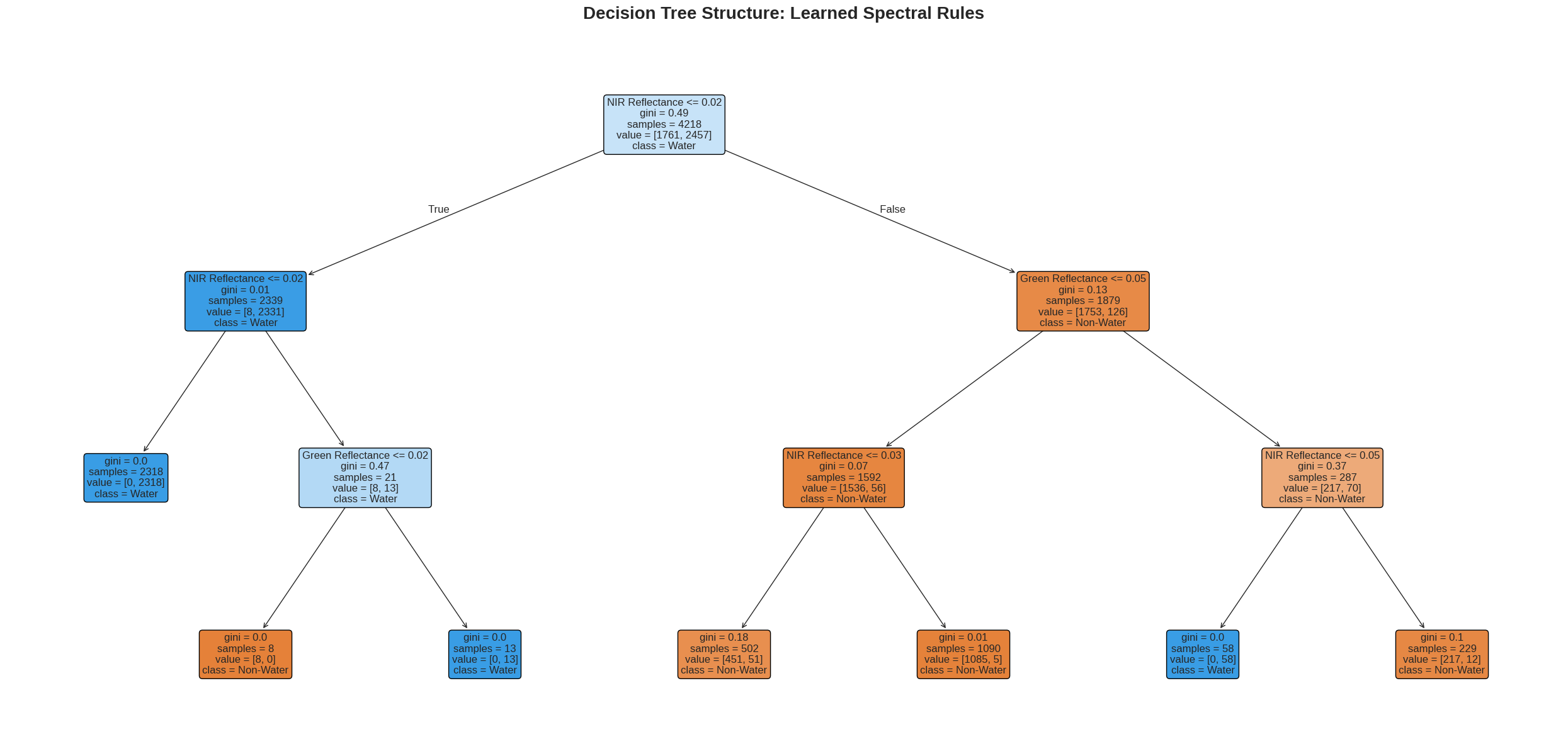
How to Read This Tree:
━━━━━━━━━━━━━━━━━━━━━━━━━━━━━━━━━━━━━━━━━━━━━━━━━━━━━━━━━━━━
• Each box is a node with a decision rule (e.g., 'NIR <= 120.5')
• 'gini' measures impurity (0 = pure, 0.5 = mixed)
• 'samples' shows how many training pixels reach this node
• 'value' shows pixel distribution [Non-Water, Water]
• Color intensity indicates class majority (darker Blue = Water, darker Orange = Non-Water)
• Leaf nodes (bottom) make the final classification for your map
Summary and Key Takeaways
Decision Trees
Learn hierarchical decision rules through recursive splitting
Create axis-aligned decision boundaries
Prone to overfitting if too deep
Easy to interpret and visualize
Advantages:
Easy to understand and visualize
No data normalization needed
Handles non-linear relationships
Feature importance easily extracted
Fast prediction
Limitations:
Overfitting: Can memorize training data
High variance: Small data changes → big tree changes
Instability: Greedy algorithm (local optima)
Bias: Favor features with many levels
References
CoPhil EO AI/ML Training Programme. (2025). Core Concepts of AI/ML for Earth Observation. https://
skotsopoulos -del .github .io /cophil -training -v1 .0 /day1 /sessions /session2 .html
End of Demo 1 Notebook