GeoPython Exercises - B
🗺️ Working with Vectors
You have been tasked with identifying high-value farm parcels and analyzing their spatial distribution. You will need to process the provided shapefile geoshape_odk_020426.shp found in data/odk/geoshape_odk_020426.shp.
1.1. Data Preparation & Exploration
Objective: Load the data and understand the coordinate system.
Read the shapefile geoshape_odk_020426.shp.
Display the crs of the dataset.
Use .head() and .info() to identify the column names for “Crop Type” and “Crop Condition”.
# Write code here💡 KNOWLEDGE CHECK
Q1. Understanding the Coordinate Reference System (CRS): What is the coordinate reference system of the geoshape_odk_020426.shp? If you want to calculate the area of the farm parcels in square meters, can you do it directly with this CRS?
A) EPSG:3857; Yes, it is the standard for web maps.

B) EPSG:4326; No, it uses degrees as units (lat/long) rather than meters.

C) UTM Zone 51N; Yes, because it is a projected coordinate system.

D) WGS84; Yes, it is the most accurate system globally.
Click to reveal answer
Correct Answer: B
The dataset is in EPSG:4326. Because this system measures locations in degrees, any area calculation would result in “square degrees,” which are physically meaningless for farming. You must use .to_crs() to project the data into a metric system (like UTM) before calculating area.
Q2. Identifying Data Sparsity: Looking at the “Non-Null Count” for the mango_stag (1 entry) and calamansi_ columns (20 entries), what can you conclude about the crops surveyed in this specific dataset of 65 entries?
A) The Mango survey is more important because it is rarer.

B) The dataset is heavily skewed toward Calamansi farmers.

C) 44 farmers forgot to fill out the crop type.

D) Mango and Calamansi are always grown together on the same 21 farms.
Click to reveal answer
Correct Answer: B
With 20 entries for Calamansi and only 1 for Mango out of 65 total rows, the data suggests this specific survey batch primarily captured Calamansi production. High “null” counts in specific crop columns usually mean those crops simply weren’t present at the surveyed sites.
Q3. Data Types and Memory: Most columns are listed as Dtype: str or object. Which specific column (field) allows this Python object to be a GeoDataFrame rather than a standard pandas DataFrame?
A) Submission (Index 0)

B) device_id (Index 66)

C) geometry (Index 82)

D) KEY (Index 72)
Click to reveal answer
Correct Answer: C
The geometry column is what makes a GeoDataFrame special. It has a specific spatial data type that stores shapes (Points, Polygons, etc.) and enables specialized GIS functions like spatial joins and area calculations.
Q4. Logic of “Other” Fields: The column abaca_vari has 4 non-null entries, and other_abac also has 4 non-null entries. What does this likely imply about the data collection process for Abaca varieties?
A) The data is duplicated and should be deleted.

B) Every Abaca farmer chose a variety that was not on the ODK form's pre-defined list.

C) The surveyors made a mistake and filled both columns by accident.

D) Abaca varieties are automatically calculated by the device.
Click to reveal answer
Correct Answer: B
It implies that for all 4 Abaca records, the variety planted was not on the pre-defined list in the ODK form, leading the surveyors to manually type the name into the “Other” text field for every single entry.
Q5. Derived Information: Data Cleaning: There are several columns with 0 non-null values (e.g., main_crop_, direction, username). If you were preparing this data for a machine learning model, what should be your first step with these columns?
A) Fill them with the number zero.

B) Replace the empty values with "Unknown".

C) Drop/Delete the columns entirely.

D) Keep them in case data is added later.
Click to reveal answer
Correct Answer: C
Columns with 100% missing values provide zero variance and no information. Keeping them increases memory usage and clutters your workspace. In data preparation, especially for modeling, your first step should be removing these “empty” features.
1.2. Complex Filtering & Cleaning
Objective: Isolate specific high-priority data.
Create a new GeoDataFrame called calamansi_farms that contains only rows where crop_type is “calamansi” AND the crop_condi (crop condition) is “normal”.
Sort these farms by their average (yield/value) in descending order.
# Write code here
💡 KNOWLEDGE CHECK
Q6. Data Types and Sorting: The column average is listed in your gdf.info() as a string (str). When you run .sort_values(“average”, ascending=False), will a value of “100” come before or after “20”?
A) "100" will come before "20" because 100 is a larger number.

B) "20" will come before "100" because string sorting (lexicographical) evaluates the first character "2" as greater than "1".

C) The code will crash because you cannot sort strings.

D) They will be sorted by the date they were entered.
Click to reveal answer
Correct Answer: B
Since the data type is a string, Python sorts them alphabetically. Just like “B” comes after “A”, “2” comes after “1”. To fix this, you must convert the column to a numeric type using pd.to_numeric().average"] = pd.to_numeric(gdf[“average”]).
Q7. Case Sensitivity: Your code looks for gdf[“crop_type”] == “calamansi”. Based on the gdf.info() output, if a surveyor entered “Calamansi” (with a capital C), will it be included in your calamansi_farms DataFrame?
A) Yes, Python automatically ignores capitalization in strings.

B) Yes, because GeoPandas is specifically designed to be case-insensitive.

C) No, Python is case-sensitive and "Calamansi" does not exactly match "calamansi".

D) No, because "Calamansi" is considered a different crop type entirely.
Click to reveal answer
Correct Answer: C
Python requires an exact match for string comparisons. To avoid missing data, it is best practice to use gdf[“crop_type”].str.lower() == “calamansi” to catch all variations of capitalization.
Q8. Spatial Consistency: Since calamansi_farms is derived from a GeoDataFrame, it still contains the geometry column. If you were to plot this new DataFrame using .plot(), what would you expect to see on the map?
A) All 65 original farm parcels, but Calamansi farms will be highlighted in red.

B) Only the boundaries or points of the 20 farms that met the "calamansi" and "normal" criteria.

C) A blank screen because filtering data deletes the spatial coordinates.

D) A heatmap showing the density of all crops in the region.
Click to reveal answer
Correct Answer: B
When you filter a GeoDataFrame, you create a new subset. The .plot() function only renders the geometries remaining in that subset. The other 45 entries are excluded from the visual output.
Q9. Handling “NaN” in Sorting: The average column only has 12 non-null entries, but there are 20 Calamansi entries. When you sort by average, where will the 8 Calamansi farms with “NaN” (empty) average values appear in your list?
A) They are automatically deleted from the DataFrame.

B) They are placed at the very top of the list.

C) They are placed at the very end of the sorted list, regardless of the sort order.

D) They are randomly scattered throughout the results.
Click to reveal answer
Correct Answer: C
By default, Pandas puts NaN (Not a Number) values at the end. You can control this behavior using the na_position=‘first’ argument if you want to see missing data at the top.
Q10. Boolean Logic: If you wanted to expand this list to include farms that are either “normal” or “excellent” condition, how would you change the & (AND) operator in your code?
A) The & (AND) operator.

B) The + (PLUS) operator.

C) The | (PIPE/OR) operator.

D) The ~ (NOT) operator.
Click to reveal answer
Correct Answer: C
The pipe operator | represents OR in Python/Pandas logic. Using & would return zero results because a single farm cannot be both “normal” and “excellent” at the same time.
1.3. Geographic Reprojection & Geometry Analysis
Objective: Calculate physical area in square meters.
The current data is in EPSG:4326 (degrees). Reproject the calamansi_farms GeoDataFrame to a metric system suitable for the Philippines: EPSG:32651 (UTM Zone 51N).
Create a new column called area_sqm using the .area property.
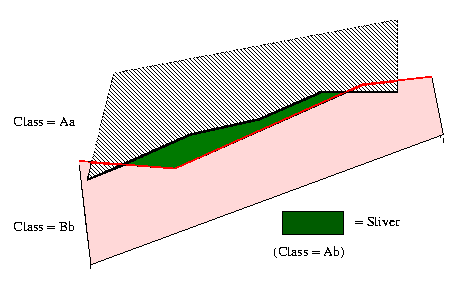
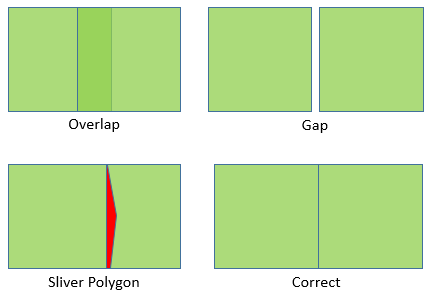
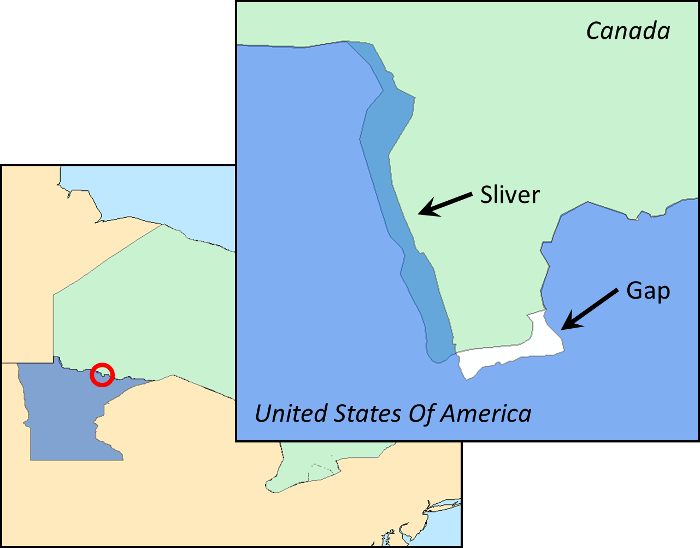
Challenge: Filter out any “sliver” polygons that have an area smaller than 5000 square meters.
# Write code here💡 KNOWLEDGE CHECK
Q11. The Logic of Reprojection: Why is converting the data to EPSG:32651 a prerequisite for calculating .area in this script?
A) Because Python cannot calculate area in decimal degrees.

B) EPSG:4326 uses degrees, which would result in area units that are not useful for farming.

C) EPSG:32651 is required to see the map in color.

D) It is a required security step for GeoPandas.
Click to reveal answer
Correct Answer: B
EPSG:4326 (WGS84) uses degrees as units. Calculating area in degrees is practically useless for agriculture. EPSG:32651 (UTM Zone 51N) uses meters, allowing .area to return real-world values in square meters.
Q12. Identifying “Slivers”: In the line calamansi_metric[“area_sqm”] > 5000, what is the physical significance of the number 5000, and why is this step called “Filtering slivers”?
A) 5000 is the maximum number of trees allowed per farm.

B) It removes farms that are too large to be managed.

C) It filters out tiny, accidental polygons (noise) smaller than 5,000 square meters.

D) It is the code used to identify the Calamansi crop type.
Click to reveal answer
Correct Answer: C
The number 5000 represents 5,000 square meters (0.5 hectares). “Slivers” are tiny, accidental polygons often created by GPS errors or overlapping map edges. This line cleans the dataset by removing “noise” that doesn’t represent actual, functional farm sizes.
Q13. Units of Measurement: If calamansi_final[“area_sqm”] gives you the size in square meters, how would you modify the code to create a new column called area_hectares?
A) area_sqm * 10000

B) area_sqm / 100

C) area_sqm / 10000

D) area_sqm + 10000
Click to reveal answer
Correct Answer: C
Since 1 hectare = 10,000 square meters, you must divide the square meter value by 10,000 to get the measurement in hectares: calamansi_final[“area_hectares”] = calamansi_final[“area_sqm”] / 10000.
Q14. Geometric Integrity: This code assumes the geometry column contains Polygons or MultiPolygons. What would happen to the area_sqm column if one of the rows was actually a Point (a single GPS ping)?
A) GeoPandas would crash with an error.

B) The area would be calculated as 1.0.

C) The area would be 0.0, and the row would be filtered out.

D) The point would be automatically converted into a small circle.
Click to reveal answer
Correct Answer: C
The area of a geometric Point is always 0. If your data contained points, they would be filtered out by your “area > 5000” rule, even if they represented valid farm locations. This analysis specifically requires “Geoshapes” (boundaries).
Q15. CRS Scope: EPSG:32651 is specific to the Central Philippines. What would happen if you ran this same code on farm data collected in Brazil or France?
A) The code would not run at all.

B) The area calculations would be highly inaccurate due to spatial distortion.

C) The results would still be perfectly accurate.

D) The units would automatically switch from meters to feet.
Click to reveal answer
Correct Answer: B
UTM zones are localized to minimize distortion. Using a Philippine-specific CRS for a farm in Brazil would result in significant “stretching” or “shrinking” of the calculated area because the projection is not designed to handle the earth’s curvature in that specific region.
1.4. Spatial Point Extraction
Objective: Generate point locations for field visits.
Create a new GeoDataFrame called farm_centers that contains the centroid of every farm in your metric GeoDataFrame.
Verify that farm_centers has the same CRS as your reprojected farms.
# Write code here💡 KNOWLEDGE CHECK
Q16. Geometry Overwriting: In the code farm_centers[‘geometry’] = farm_centers.centroid, what happens to the original polygon boundaries of the farms?
A) They are moved to a new hidden column.

B) They are permanently overwritten by a single point.

C) They are kept as a "background layer" in the GeoDataFrame.

D) The polygons are automatically shrunk until they become points.
Click to reveal answer
Correct Answer: B
Assigning the .centroid result to the ‘geometry’ column replaces the existing shape data. Since a GeoDataFrame row can typically only have one active geometry at a time, the polygon boundary is lost in that specific DataFrame.
Q17. The Importance of .copy(): Why is the line farm_centers = calamansi_final.copy() used before calculating centroids?
A) To make the code run faster.

B) Because .centroid only works on copied data.

C) To prevent changes in farm_centers from also changing calamansi_final.

D) To double the amount of memory available for the calculation.
Click to reveal answer
Correct Answer: C
In Python/Pandas, if you don’t use .copy(), farm_centers might just be a “pointer” to calamansi_final. If you changed the geometry to points without a copy, you would accidentally destroy the polygon data in your original variable as well.
Q18. Area of a Centroid: After converting the polygons to centroids, what will be the result of farm_centers.area.sum()?
A) 0.0

B) The total area of all the original farms.

C) The average area of the farms.

D) An AttributeError because points don't have area.
Click to reveal answer
Correct Answer: A
Centroids are zero-dimensional points. Mathematically, a point has no length, width, or area. Even though it represents the center of a farm, the geometry object itself has an area of exactly zero.
Q19. Spatial Pitfalls (Concave Shapes): If a farm is shaped like a “C” or a “Donut,” where will the .centroid be located?
A) It will always be on the northernmost boundary.

B) It is guaranteed to be inside the farm's soil area.

C) It could potentially fall outside the actual farm boundaries.

D) It will be placed at the farm's main entrance.
Click to reveal answer
Correct Answer: C
The centroid is the geometric “mean” of all coordinates. For concave shapes (like a “U”) or shapes with holes, the average center often lands in the “empty” space outside the actual polygon.
Q20. Practical Use Case: Why would a researcher convert farm boundaries into centroids for a final analysis?
A) To calculate the amount of fertilizer needed per hectare.

B) To create a Heatmap (Density Map) of farm locations.

C) To measure the perimeter of the farm more accurately.

D) To see the exact shape of the farm from a satellite view.
Click to reveal answer
Correct Answer: B
Points are much more efficient for statistical “clustering” and creating heatmaps. It allows you to see the “center of gravity” of Calamansi production without the visual clutter of overlapping farm boundaries.
1.5. The Challenge: The Agricultural Containment Zone
The Department of Agriculture has identified the largest Calamansi farm in the region as a “Model Farm.” They want to study the potential spread of cross-pollination or pest risks. To do this, they need to analyze every farm within a 5000-m equivalent radius of this farm’s center.
Identify the Source:
From your Calamansi GeoDataFrame, find the single largest farm by area.
Create the Buffer (The Influence Zone):
Extract the centroid of that largest farm. Generate a 5000-meter buffer around that point.
Spatial Intersection:
Find all other farm polygons (from the original dataset) that intersect with this 5000-meter buffer.
Visual Documentation:
Create a map using the following layers from your cheat sheet:
The Buffer: Plot the 5000-meter buffer zone in a light color (alpha=0.3).
The Neighbors: Plot all farms that intersect the buffer in a distinct color.
The Lead Farm: Plot the original largest farm in a bold color.
# Write code here💡 KNOWLEDGE CHECK
Q21. Buffer Generation: In the code impact_zone = largest_farm.centroid.buffer(5000), what does the resulting impact_zone object represent?
A) A square bounding box with 5000-meter sides around the farm.

B) A new polygon representing a circle with a 5000-meter radius starting from the farm's center.

C) A list of the 5000 nearest farms to the model farm.

D) the total area of the farm multiplied by 5000.
Click to reveal answer
Correct Answer: B
The .buffer() method creates a new geometric shape (a polygon) that extends a specified distance in all directions from the input geometry. Because it is applied to a centroid (a single point), the resulting shape is a perfect circle.
Q22. Spatial Predicates: What is the purpose of the .intersects() method in the line gdf_metric[gdf_metric.intersects(impact_zone.union_all())]?
A) It calculates the driving distance between the model farm and all other farms.

B) It identifies every farm that has even a small part of its area inside or touching the 5000-meter buffer.

C) It deletes all farms that are outside the buffer zone to save memory.

D) It merges all the neighbor farms into one single large polygon.
Click to reveal answer
Correct Answer: B
intersects is a spatial predicate. It returns True if two geometries share any portion of space (including boundaries). This allows you to “filter” the GeoDataFrame based on their physical location relative to the impact zone.
Q23. Visual Layering: In the “Visual Documentation” section, why is neighbors.plot called before largest_farm.plot?
A) Because the neighbors are more important to the Department of Agriculture.

B) To ensure the "Lead Farm" (red) is drawn on top of the "Neighbors" (orange) so it isn't hidden by them.

C) Because the largest farm has a smaller area and takes less time to render.

D) Python only allows the largest_farm to be plotted if it is the last line of code.
Click to reveal answer
Correct Answer: B
In mapping and plotting, the order of code determines the “Z-order” (stacking order). Layers defined later in the script are drawn “on top” of layers defined earlier. Since the lead farm is technically one of the neighbors, plotting it last with a linewidth=2 ensures its specific boundary stands out clearly.
Q24. Metric Consistency: What would happen if you tried to intersect the original gdf (in EPSG:4326) with impact_zone instead of using gdf_metric?
A) The code would work perfectly because GeoPandas handles units automatically.

B) The code would fail or return zero results because one is in degrees and the other is in meters.

C) The buffer would automatically shrink to fit the degrees of the original gdf.

D) The map would display, but the farms would be shifted by thousands of miles.
Click to reveal answer
Correct Answer: B
In spatial analysis, both layers must be in the same Coordinate Reference System (CRS). impact_zone was created using metric units (from calamansi_final), while the original gdf is in degrees. Attempting to intersect them is like trying to compare kilometers to Celsius—the math simply doesn’t align.
🮕 Working with Rasters
You will identify “lush” zones (NDVI > 0.6), count how many pixels fit that criteria, and use the image’s metadata to calculate the actual ground area they cover. You will use the data in data/S2_LS_test_data/S2_test.tif
2.1. Reprojection & Grid Alignment
Objective: Transform geographic imagery (degrees) into a metric coordinate system (meters) to enable accurate physical measurements.
Initialize Parameters: Define your target Coordinate Reference System (CRS) as EPSG:32651 (UTM Zone 51N). This ensures your units are in meters rather than degrees.
Calculate the Destination Grid: Use the calculate_default_transform function. This determines the new width, height, and transform matrix required to fit your original image into the new projection without losing data.
Prepare Destination Arrays: Initialize two empty NumPy arrays (red_m and nir_m) using np.zeros. Use the dimensions calculated in the previous step and set the data type to float32.
Execute the Reprojection (Warping): Loop through the required bands (Red and NIR). Use the reproject function to map the pixels from the original source to your new metric arrays using bilinear resampling for smooth transitions.
💡 KNOWLEDGE CHECK
Q1. Raster Reprojection: Why is the calculate_default_transform function necessary before running the reproject loop?
A) It compresses the image to save disk space.

B) It calculates the new dimensions (width/height) and pixel alignment required to represent the curved earth in a flat metric grid (EPSG:32651).

C) It identifies which pixels in the image contain clouds.

D) It converts the image colors from RGB to grayscale.
Click to reveal answer
Correct Answer: B
When you change a Coordinate Reference System, the shape of the image “warps.” This function calculates how many pixels wide and high the new image needs to be and creates a new “transform” (the mapping of pixel rows/cols to real-world coordinates).
Q2. Band Selection: In the loop for idx, dest in [(3, red_m), (4, nir_m)]:, what do the numbers 3 and 4 likely represent?
A) The brightness levels of the pixels.

B) The file size of the output in megabytes.

C) The specific band indices in the Sentinel-2 file.

D) The number of seconds to wait between processing steps.
Click to reveal answer
Correct Answer: C
Satellite images are “stacks” of data. To calculate vegetation health, you don’t need the whole stack; you specifically need the Red and Near-Infrared (NIR) bands. src.read(idx) pulls only those specific layers from the original file.
Q3. Memory Allocation: What is the purpose of the line red_m = np.zeros((height, width), dtype=‘float32’)?
A) It deletes any existing data in the memory.

B) It creates an empty "canvas" (an array of zeros) with the correct dimensions to hold the data once it is reprojected.

C) It sets all the "Red" values in the image to zero to remove them.

D) It converts the image into a 3D model.
Click to reveal answer
Correct Answer: B
reproject needs a “destination” array to write into. By creating a NumPy array of zeros with the height and width, you are preparing the memory space for the incoming pixel values.
Q4. Resampling Methods: The code uses resampling=Resampling.bilinear. Why use bilinear instead of nearest neighbor for this type of satellite data?
A) Bilinear is much faster for the computer to calculate.

B) Bilinear produces a smoother result by averaging the four nearest pixels, which is better for continuous data like spectral reflectance.

C) Nearest neighbor would change the colors of the plants to blue.

D) Bilinear is the only method that works with float32 data.
Click to reveal answer
Correct Answer: B
Nearest is best for categorical data (like “Forest” vs “Urban”), but Bilinear or Cubic is preferred for continuous imagery (like Red/NIR bands) because it prevents the “staircase” effect and provides a more accurate representation of light values across the warped grid.
Q5. Data Type Precision: In the code, you initialized the arrays using dtype=‘float32’. Why use float32 for the destination arrays instead of the default integer types often found in raw satellite files?
A) Because satellite images can only be saved in float format.

B) To make the satellite image appear brighter on the screen.

C) Because float32 uses less memory than standard integers.

D) Because calculating vegetation indices (like NDVI) results in decimal values between -1.0 and 1.0, which would be lost/rounded if stored as integers.
Click to reveal answer
Correct Answer: D
Raw satellite data often comes as “Digital Numbers” (integers). However, once you reproject them (which involves averaging pixel values) or prepare them for math (like NDVI), the results are decimals. If you used an integer dtype, a result like 0.45 would be rounded to 0, making your analysis useless. float32 provides the precision needed to track subtle changes in crop health.
2.2. Spectral Analysis & Area Quantification
Objective: Apply remote sensing logic to identify high-density vegetation and calculate its precise physical extent in metric units (square kilometers).
Calculate the Vegetation Index: Using the reprojected Red and NIR arrays from Part 1, implement the Normalized Difference Vegetation Index (NDVI) formula.
Tip: Include a tiny epsilon value (1e−10) in the denominator to avoid errors on null or zero-value pixels.
Apply a Lush Threshold: Create a boolean mask named lush_mask. Set the threshold to 0.6 to isolate only the most dense and healthy vegetation (typically forests or high-growth agriculture).
Determine Pixel Resolution: Extract the pixel_width and pixel_height from the metric transform object created in Part 1.
Note: Since the data is now in UTM (EPSG:32651), these values represent meters.
Quantify Spatial Extent: Multiply the total count of “True” pixels in your mask by the area of a single pixel to get the total area in square meters.
Convert the final result into square kilometers by dividing by 1,000,000 for a more readable professional report.
# Write code here💡 KNOWLEDGE CHECK
Q6. Preventing Math Errors: In the formula ndvi = (nir_m - red_m) / (nir_m + red_m + 1e-10), why is 1e-10 added to the denominator?
A) To increase the brightness of the resulting NDVI image.

B) To prevent a "division by zero" error in pixels where both NIR and Red are zero.

C) To calibrate the satellite data for cloud cover.

D) To ensure the NDVI values stay above 0.
Click to reveal answer
Correct Answer: B
In areas like deep water or shadows, the NIR and Red values might both be zero. Dividing by zero would cause the code to crash or produce “NaN” values. Adding a tiny “epsilon” value (1e-10) ensures the calculation is stable without changing the actual result.
Q7. Logical Masking: The code defines lush_mask = ndvi > 0.6. What is the result of this operation in NumPy?
A) A list of the coordinates for the healthiest plants.

B) A single number representing the average health.

C) A Boolean array (True/False) of the same shape as the image.

D) A cropped version of the image containing only green pixels.
Click to reveal answer
Correct Answer: C
Applying a comparison operator to a NumPy array creates a “Mask.” Every pixel that meets the condition (NDVI > 0.6) becomes True (or 1), and every pixel that doesn’t becomes False (or 0).
Q8. Pixel Area Calculation: How does the code calculate the physical size of a single pixel using the transform?
A) By adding the width and the height.

B) By multiplying the pixel width (transform[0]) by the absolute pixel height (transform[4]).

C) It assumes every pixel is exactly 1 square meter.

D) By dividing the total area by the number of pixels.
Click to reveal answer
Correct Answer: B
The affine transform contains the “pixel size” in its first and fifth elements. Since your data is in a metric CRS (EPSG:32651), multiplying these dimensions gives you the area in square meters.
Q9. Boolean Summation: In the line lush_mask.sum(), why does summing a list of “True” and “False” values work to find the total area?
A) Python converts True to 1 and False to 0, effectively counting the "lush" pixels.

B) It calculates the average color of the mask.

C) Summing is a requirement for the rasterio library to function.

D) It finds the highest NDVI value in the entire mask.
Click to reveal answer
Correct Answer: A
In computer logic, True has a value of 1. By summing the mask, you are counting how many pixels passed your health threshold. You then multiply this count by the pixel_area to find the total geographic size of the lush vegetation.
Q10. Unit Conversion: Why is the final result divided by 1,000,000?
A) To convert the area from square meters to square kilometers.

B) To account for the altitude of the Sentinel-2 satellite.

C) To remove the 1e-10 epsilon value added earlier.

D) To convert the measurement from hectares to square meters.
Click to reveal answer
Correct Answer: A
Since 1 km=1,000 meters, a square kilometer is 1,000m×1,000m=1,000,000 m^2. Dividing by this number makes the final “Total Lush Area” much easier to read and report for regional analysis.
2.3. Exporting the Georeferenced Image
Objective: Save the binary lush_mask as a standardized GeoTIFF file. To do this correctly, you must use the metric transform and UTM CRS generated in Part 1 so the file appears in the correct location on a map
Prepare Metadata: Copy the metadata profile from the original source file.
Update Parameters: Modify the metadata to match your new results:
Change the driver to GTiff.
Update dtype to uint8 (since the mask is 0s and 1s).
Set count to 1 (we are only saving the mask layer).
Crucial: Update width, height, crs, and transform to match the UTM grid from Part 1.
Write to Disk: Open a new file in “write” mode (‘w’) and write the lush_mask array.
# Write code here💡 KNOWLEDGE CHECK
Q11. Understanding Metadata: In the output_meta dictionary, what is the purpose of the ‘count’: 1 key-value pair?
A) It limits the file size to 1 Megabyte.

B) It tells the GeoTIFF driver that the output file will have only one data band (the lush mask).

C) It indicates that only one farm was analyzed.

D) It ensures the code only runs once to prevent duplicates.
Click to reveal answer
Correct Answer: B
Satellite images often have multiple bands (Red, Blue, Green, NIR). Since the lush_mask is a single binary layer, we set the count to 1. If we were exporting a full-color map, we would set this to 3.
Q12. Data Type Conversion: Why is the mask converted using .astype(‘uint8’) before being written to the file?
A) To make the image colors look more realistic.

B) Because the dtype in the metadata is set to uint8, and binary Boolean values (True/False) must be converted to 8-bit integers (1/0) to be compatible.

C) To compress the file so it can be sent via email.

D) To convert the coordinate units from meters to pixels.
Click to reveal answer
Correct Answer: B
Raster files generally don’t store “Boolean” types. By converting to uint8, True becomes the number 1 and False becomes 0. This matches the metadata definition and is the standard way to store “masks” in GIS software.
Q13. Spatial Reference Persistence: Why must the ‘crs’ and ‘transform’ be included in the output_meta?
A) Without them, the image would just be a regular picture with no geographic location (it wouldn't "line up" on a map).

B) To tell the computer which folder to save the file in.

C) They are used to calculate the price of the satellite imagery.

D) They define the brightness and contrast of the output pixels.
Click to reveal answer
Correct Answer: A
This is what makes it a GeoTIFF. The crs tells software where on Earth the image belongs, and the transform tells it exactly which pixel corresponds to which GPS coordinate. Without these, the image would lose its spatial context.
Q14. The Power of ** output_meta: What does the double asterisk do when passing output_meta into rasterio.open?
A) It encrypts the metadata for security.

B) It tells Python to "unpack" the dictionary so each key becomes a separate argument (like width=width, height=height).

C) It multiplies the metadata values by two.

D) It flags the file as a "read-only" document.
Click to reveal answer
Correct Answer: B
In Python, ** is the dictionary unpacking operator. Instead of typing out every single parameter inside the rasterio.open() function, this shortcut passes all the settings we defined in the dictionary at once.
Q15. Handling NoData: The metadata sets ‘nodata’: 0. What does this mean for someone opening this file in a GIS program like QGIS?
A) The program will crash if it finds a zero.

B) The program will treat pixels with a value of 0 as transparent or "missing data."

C) All pixels will be forced to have a value of 1.

D) The file will have no physical size.
Click to reveal answer
Correct Answer: B
Setting a nodata value allows GIS software to distinguish between “Real Data” (the 1s representing lush vegetation) and “Background/Empty space” (the 0s). This makes the map look much cleaner by hiding the parts of the image that weren’t part of the analysis.
2.4. Visualizing the Analysis
Objective: Create a side-by-side comparison using matplotlib. This helps verify that your NDVI calculation correctly matches the features on the ground (e.g., ensuring the “lush” green areas in the photo are the ones captured by your mask).
Prepare the Plot: Set up a figure with two subplots (1 row, 2 columns).
Display the NIR Band: In the first plot, display the NIR band. NIR is excellent for seeing vegetation structure.
Display the Lush Mask: In the second plot, display the binary mask using a specific color map (like ‘Greens’) to highlight the detected forest/crops.
Add Context: Include titles for both plots and a caption showing the total area calculated in Part 2.
# Write code here💡 KNOWLEDGE CHECK
Q16. Comparing Spectral Visuals: Why is the Near-Infrared (NIR) band plotted alongside the Lush Mask for comparison?
A) To show the actual colors (Red, Green, Blue) as the human eye sees them.

B) To check for cloud cover, which only appears in the NIR band.

C) To double the file size of the final report.

D) Because the NIR band naturally highlights healthy vegetation as bright pixels, helping to visually verify if the "Lush Mask" logic correctly identified the same areas.
Click to reveal answer
Correct Answer: D
Healthy plants reflect a high amount of Near-Infrared light. In a grayscale NIR plot, vegetation looks bright white, while water and soil look dark. By placing this next to the “Lush Mask,” a scientist can quickly see if the NDVI threshold (0.6) effectively captured the brightest (healthiest) parts of the image.
Q17. Visual Perception: In the line im1 = ax1.imshow(nir_m, cmap=‘gray’), what does the ‘gray’ colormap represent?
A) It converts the satellite data into an old-fashioned photograph.

B) it represents the intensity of light reflection, where 0 (black) is no reflection and higher values (white) are high reflection.

C) It is used to indicate areas where there is no data.

D) It is a required setting for all satellite NIR bands.
Click to reveal answer
Correct Answer: B
Since NIR is outside the visible spectrum, we can’t show its “real” color. Using a grayscale colormap is standard practice; it allows us to see the “gradient” of light intensity, which is critical for distinguishing between different types of land cover.
Q18. Map Layout: What is the purpose of the fraction=0.046 and pad=0.04 arguments in the fig.colorbar function?
A) They are aesthetic adjustments that ensure the colorbar is the same height as the map and slightly separated from it.

B) They define the coordinate location of the farms.

C) They set the transparency of the colorbar.

D) They convert the legend from meters to kilometers.
Click to reveal answer
Correct Answer: A
By default, Matplotlib colorbars can be much taller than the actual plot. These specific “magic numbers” are a common trick used by data scientists to ensure the colorbar scales perfectly with the height of the image, making the final report look professional.
Q19. Interpreting the Result: If the ax2 plot (Lush Mask) is almost entirely white (empty), but the ax1 plot (NIR) shows bright areas, what does this likely imply?
A) The satellite camera was broken during the pass.

B) The NDVI threshold of 0.6 might be too high for this specific region or season.

C) The NIR band is more accurate than the NDVI formula.

D) The image needs to be reprojected again.
Click to reveal answer
Correct Answer: B
If the NIR shows bright vegetation but the Mask is empty, it means your “filter” is too strict. The plants might be healthy but only reaching an NDVI of 0.4 or 0.5. This visual comparison is exactly how analysts “fine-tune” their models to fit different agricultural environments.
Q20. Information Hierarchy: Why is plt.suptitle used instead of just plt.title?
A) suptitle is for 3D maps only.

B) It is a more secure way to save text data.

C) suptitle creates a main title for the entire figure, centered above both subplots, while set_title provides individual labels for each specific map.

D) It allows the text to be printed in different languages.
Click to reveal answer
Correct Answer: C
When using subplots (1 row, 2 columns), plt.title would only apply to one side. suptitle (Superior Title) provides the overarching context—in this case, the total area calculation—that applies to both pieces of evidence shown below it.